Screens splits iPhone Duo between remote desktop and keyboard
Edovia introduces a layout for the folded display and new dictation options. Its presentation image explains the division; this is not a Lyntev test.
By Wellinton OliveiraCEO of Lyntev
Published
3 min read
Key points
- The remote desktop occupies the upper half; keyboard and trackpad sit below.
- Dictation can type directly or paste through the clipboard.
- The announcement does not install macOS on iPhone or measure latency.
Screens 5.10.6 adds a Laptop Mode that lets a partly folded iPhone Duo act as a controller for a remote computer. According to Edovia’s announcement on November 25, the desktop occupies the upper half of the display while a virtual keyboard and trackpad appear below. This changes the layout of remote access; it does not run macOS on the phone.
The update also changes dictation options, available desktop sizes and some keyboard, mouse and Apple Pencil controls. Edovia describes these features in its release announcement (opens in a new tab). Lyntev has not conducted a hands-on test of Laptop Mode or measured its performance.
What the fold separates
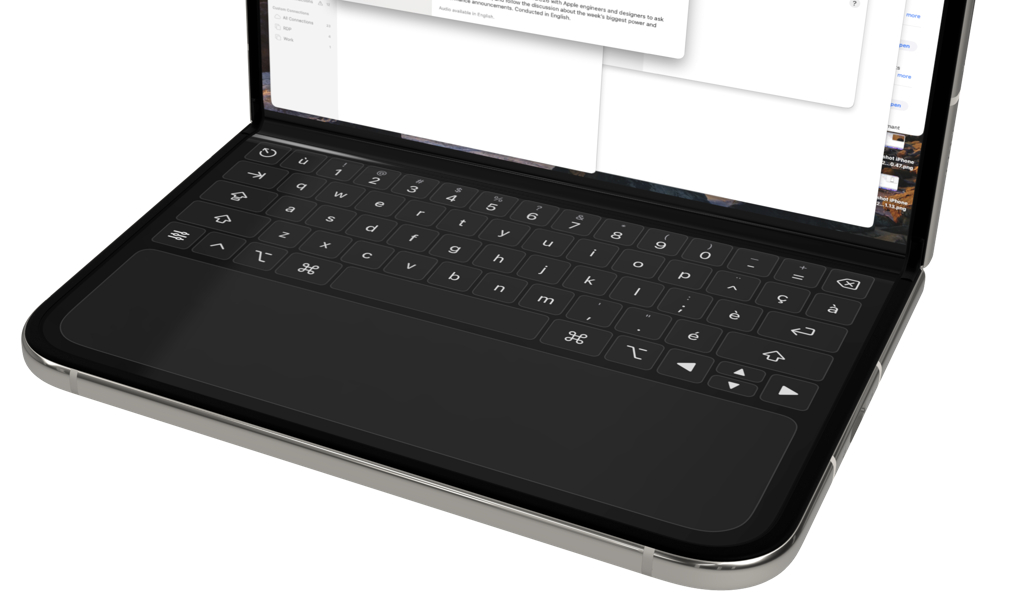
In the detail of Edovia’s presentation image, the lower area contains keys, arrows and a trackpad surface. Part of the remote computer’s desktop appears above the fold. This visual separation is the announced change: the space receiving input sits below the space displaying the distant computer.
The image is the supplier’s presentation composition, partially reproduced here to discuss that arrangement. It is not a photograph of a Lyntev test. Nor does it demonstrate local execution of the applications shown, connection latency or gesture precision. Resembling a small laptop does not turn the phone into a MacBook.
The functional distinction matters: displaying a remote desktop and sending commands to it is different from installing that computer’s operating system on the phone. The announcement concerns how a session uses the folded screen. It does not announce an iPhone version of macOS or convert Mac programs into local phone applications.
Keyboard, gestures and desktop size
Edovia says the trackpad retains gestures already available in Screens. Its custom keyboard supports multiple languages, follows the keyboard language selected in the system and allows a downward swipe on keys to access secondary characters. The supplier compares that last gesture with the one used on an iPad.
These are distinct aspects of text input: the selected language determines the keyboard displayed, while the gesture provides access to other characters. The description is not a measurement of typing speed. It also does not establish that a virtual keyboard offers the same experience as physical keys.
The announcement connects Laptop Mode with the previously introduced High Performance Screen Sharing. According to the company, this option automatically resizes the remote Mac’s desktop to fit the upper half and also carries remote audio. Edovia presents smooth graphics as an advantage, but the announcement supplies no latency measurement for Lyntev to compare.
Resizing explains how the desktop can match the available area. It does not establish that every application will be equally comfortable within it. The composition shows the proposed layout; assessing reading comfort and input would still require observation of actual use.
Two ways to send dictated text
The new dictation options let users choose between typing text directly on the remote computer and pasting it through the clipboard. An additional option automatically presses Return after submission. The controls appear in Settings, under Controls and Dictation.
The company highlights clipboard pasting when third-party keyboards such as Typeless are used: it says this preserves paragraph breaks without triggering Return prematurely. This changes how dictated text is submitted, separately from Laptop Mode’s layout.
Availability described in the announcement
The release also includes more flexible High Performance desktop sizes on iPhone, including portrait resolutions, Apple Pencil actions for showing or hiding the keyboard, and adjustments to mouse and trackpad handling. The announcement mentions general usability, stability and performance improvements without quantifying their effects.
On November 25, Edovia listed version 5.10.6 as available for iOS, iPadOS and visionOS. It said the macOS version was awaiting App Store approval; that describes the announcement’s status rather than a subsequent store check. The company lists monthly and annual subscriptions and a Lifetime purchase. The change illustrated by the composition remains the division of the display for a remote session, subject to the limits identified above.
Sources
Documents, reporting and references gathered for this story. Access limits are stated in the text or the reference itself.
A primary source is the origin of a document or statement; it may be the interested party itself. This label does not mean independent confirmation. The list also includes context and image references where relevant.
- Introducing the World’s Smallest Laptop. Tiny Violin Not Included. (opens in a new tab)Edovia, . Primary source. Accessed 27 November 2026
Topics

Written by
Wellinton OliveiraCEO of Lyntev
Technology with context, original analysis and sources you can consult.