Microsoft fixes bug that could crash some Windows Server 2025 machines
Microsoft released an out-of-band fix on 25 November for Windows Server 2025 Datacenter: Azure Edition. The fault could bring down some servers after November’s security update.
By Wellinton OliveiraCEO of Lyntev
Published
Updated
3 min read
Key points
- KB5138318 fixes a networking fault on some machines.
- The issue followed the KB5131077 security update of 10 November.
- Microsoft distributes the fix through Windows Update and says it takes effect without a restart.
KB5138318 fixes a networking fault that could bring down some Windows Server 2025 machines. Microsoft released the update on 25 November for Datacenter: Azure Edition and says the fix takes effect without restarting the system.
Two update numbers with different effects
The KB5131077 Hotpatch security update was released on 10 November with OS build 26100.33730. The fault Microsoft described occurred after that update was installed and involved how the system handled IPv6 network routes. Microsoft did not say how many machines stopped unexpectedly.
The KB5138318 fix came 15 days later and takes the system to build 26100.33732. Microsoft classifies it as a cumulative release outside its monthly cycle, without new security fixes. The two identifiers tell administrators different things when they check a machine’s update history. The first identifies the monthly package after which the fault could occur. The second identifies the fix.
| Package | Release date | OS build | Purpose |
|---|---|---|---|
| KB5131077 | 10 November | 26100.33730 | Monthly Hotpatch security update |
| KB5138318 | 25 November | 26100.33732 | Cumulative fix for the networking fault |
The second release describes a problem observed after the first package. The sequence helps explain a machine’s update history, but timing alone does not connect every shutdown to the same fault. The release note limits the problem to certain network configurations and gives no estimate of the number of affected installations. Nor does it provide a list of disrupted services.
What to check in the server’s update history
Microsoft’s release note says the package installs automatically through Windows Update. It does not list the Microsoft Update Catalog or Windows Server Update Services as distribution channels for this package. Microsoft requires the KB5126646 baseline before the fix can be installed. The server must also have version 26100.33634 or later of the servicing stack, the Windows component that installs updates. The package includes a newer stack, version 26100.33822, identified as KB5131079. The separate build number, 26100.33732, identifies the patched version of the operating system.
For machines that installed previous updates, Microsoft says Windows Update downloads only the new changes included in the package. The published file list separates operating system changes from the files for the component that installs updates. Both appear in the same release note, but Microsoft gives them different version numbers.
Microsoft says it was unaware of any issues with the replacement package in the release note’s known-issues section. That describes what the company knew at the time. The same section is where Microsoft records any changes to the package’s known-issues status.
From Lyntev, which publishes this site
- A backup plan you can actually restoreFree guide. Decide what to protect, how much work you can afford to redo and how to rehearse recovery.
When Hotpatch removes the need to restart
Hotpatch for Windows Server applies updates to eligible servers without the usual restart. Microsoft documents the feature separately for desktop versions of Windows. Some Windows Server baseline updates still require a restart. The no-restart statement in this release note applies specifically to KB5138318.
In a typical cycle, a server first receives a cumulative baseline update. Subsequent months can bring Hotpatch updates for that baseline. A new baseline arrives periodically with changes that require the system to restart. The approach reduces the number of restarts across the cycle while leaving some maintenance restarts in place.
Microsoft’s two pages also cover different sets of machines. The general documentation describes Hotpatch availability on supported virtual machines on Azure and Azure Local, and on Azure Arc-connected servers. The applicability line on the 25 November release note identifies Windows Server 2025 Datacenter: Azure Edition. The wider availability of Hotpatch alone does not establish whether this package is distributed to another edition.
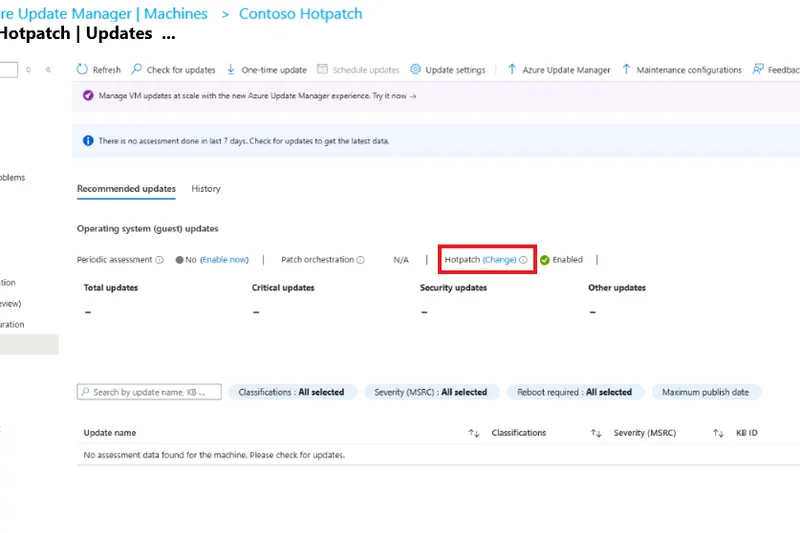
Azure Update Manager shows Hotpatch status separately from installation history. A server can show Hotpatch as enabled before the 25 November package is installed. The update number or OS build helps administrators tell the two states apart.
Whether the service has checked for updates is another question. Microsoft’s management documentation describes periodic or one-off assessments that detect available packages. An assessment reports availability for that machine, while update history records completed installations. KB5138318 is the identifier for this specific fix.
Corrections
. Clarified the prerequisites for the fix and the version numbers for the servicing stack and operating system.
Sources
Documents and reporting consulted for this story.
- November 25, 2026 — Hotpatch KB5138318 (OS Build 26100.33732) Out-of-bandMicrosoft Support, . Primary source. accessed 26 November 2026
- November 10, 2026 — Hotpatch KB5131077 (OS Build 26100.33730)Microsoft Support, . Primary source. accessed 26 November 2026
- Hotpatch for Windows ServerMicrosoft Learn. Primary source. accessed 26 November 2026
- Manage hotpatches on Arc-enabled machinesMicrosoft Learn. Primary source. accessed 26 November 2026
Topics

Written by
Wellinton OliveiraCEO of Lyntev
Technology with context, original analysis and sources you can consult.